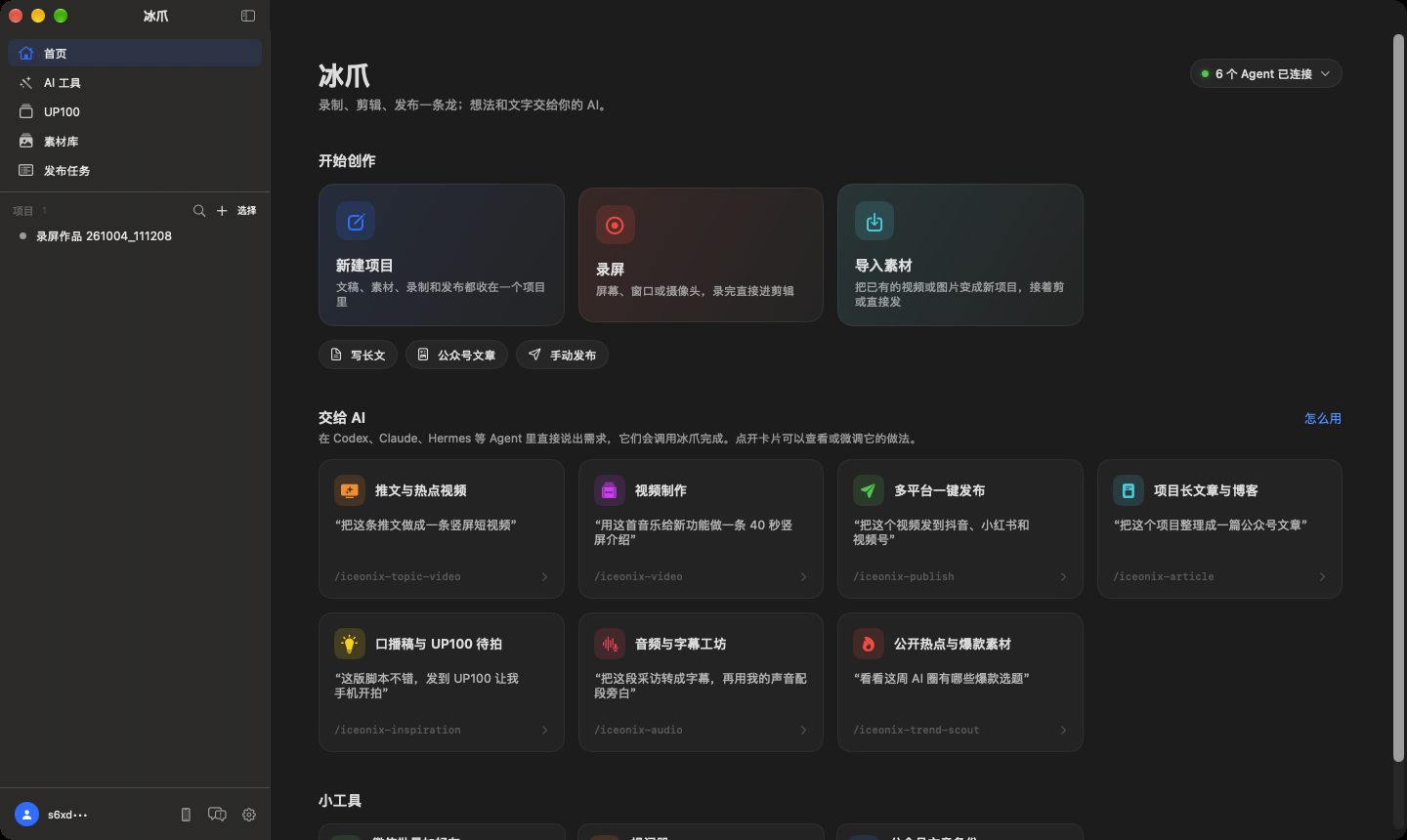
ICEONIX PRODUCT MAP · 0.4.1

Not a publish button. A complete local execution chain.

Iceonix keeps ideation, capture, editing, AI processing, approval, Safari distribution, and result archiving in one Mac workflow—operated by you or orchestrated through CLI and MCP.

✓ Apple Silicon✓ macOS 15+✓ Notarized DMG✓ Local-first project assets

ICEONIX · PROJECT FLOW

Launch Story 036

LOCAL
01 Idea READY
02 Record READY
03 Edit READY
04 AI process READY
05 Approve READY
06 Distribute RUN
07 Archive WRITE
9 creation stages
7 AI studio modules
6 verified video platforms
1 project across the workflow

WORKFLOW

From an idea to a verifiable publishing result

Every step shares the same project truth instead of relying on copy and paste between apps.

01

Idea

Capture a rough thought or let an agent prepare scripts and platform copy.

02

Record

Capture a screen, app, region, camera, microphone, system audio, or iOS device.

03

Edit

Finish timelines, captions, focus, framing, audio, covers, and export.

04

AI process

Run transcription, synthesis, cloning, repair, separation, and music locally.

05

Approve

Review platform fields and rehearse irreversible steps with dry-run.

06

Distribute

Reuse real Safari sessions, execute serially, and isolate failures.

07

Archive

Write links, timestamps, errors, and final status back to the project.

CURRENT PRODUCT

What the current app actually does

Based on the 0.4.1 UI, project models, platform drivers, and CLI/MCP contracts. Verified and implemented are intentionally different labels.

01 · CREATION DESK

Creation desk and project library

Implemented

Ideas, recording packages, video, image posts, WeChat articles, and blogs move through one lifecycle instead of scattered folders.

  • Idea, planned, producing, ready, published, failed, image, article, and blog stages
  • Local projects, editable .iceonixrec packages, and optional iCloud projects
  • iceonix.json as the publishing contract; GRDB for indexes and records
  • Source filters, time/duration sorting, publishing windows, and global dry-run
  • Deduplication locks, stale-lock recovery, and retries
  • NAS indexes, copies, check-out, editing locks, and push-back

02 · NATIVE CAPTURE

Native recording workstation

Implemented

Multi-source capture for tutorials, product demos, talking-head videos, and mobile demos—not merely a screen rectangle.

  • Full display, selected display, app, window, and custom region
  • Privacy exclusions, hidden Dock, and hidden desktop icons
  • Camera picture-in-picture with mirroring, shapes, borders, and sizing
  • Microphone, system audio, gain, delay, and separate tracks
  • USB iPhone/iPad video and device audio
  • Teleprompter with speech follow, mirroring, speed, and styling
  • On-screen drawing, whiteboard, ticker, and floating meter
  • Resolution, frame rate, bitrate, and editable .iceonixrec packages

03 · CREATOR EDITOR

Creator-focused editing and delivery

Implemented

Built for screencasts, talking-head content, and social delivery. It does not pretend to replace deep film post-production.

  • Timeline split, trim, history, and silence detection
  • AI filler-word review and assisted cleanup
  • Local/remote captions, word timing, segment editing, and SRT
  • Auto focus, manual zoom segments, cursor smoothing/hiding/highlight
  • Camera overlays, full-screen segments, transitions, and zoom response
  • Landscape, portrait, square reframing, and backgrounds
  • Corners, shadows, click sounds, music, and separate audio tracks
  • Frame, local image, or AI cover art with layered text
  • Video, GIF, FCPXML, and DaVinci handoff

04 · LOCAL AI STUDIO

AI studio and local models

Implemented

Image jobs enter the local gallery; speech and audio models can run on the Mac and are downloaded on demand.

  • Text-to-image, reference editing, history, retry, and local gallery
  • Qwen3-ASR, Nemotron, and Omnilingual transcription
  • Forced alignment, speaker labels, SRT, VTT, and TXT
  • Qwen3-TTS, VoxCPM2, Kokoro, and voice presets
  • Recorded/imported references, voice cloning, and style prompts
  • Local denoise, restoration, and audio upscaling
  • Four-stem vocal, drum, bass, and other separation
  • Local MAGNeT background music and model warehouse

05 · AGENT CONTROL PLANE

Hermes, CLI, and MCP

Implemented

Agents understand, generate, and orchestrate. Iceonix owns final clicks, locks, retries, verification, and result writes.

  • Hermes install, upgrade, initialization, and status
  • Hermes WebUI, conversation history, and runtime logs
  • Multiple profiles and agent members
  • Shared AGENTS.md creative core and project knowledge
  • CLI publishing, login diagnostics, models, ASR, TTS, enhancement, and separation
  • MCP tools for publishing, login, ideas, images, and speech
  • A local relay keeps one app in control of Safari
  • Irreversible tools explicitly require human approval

06 · VERIFIED DISTRIBUTION

Real-Safari multi-platform distribution

Verified

No cloud-held account credentials and no headless browser. Iceonix reuses the user's real Safari sessions on their Mac.

  • Verified video flows for WeChat Channels, Douyin, Xiaohongshu, Bilibili, Kuaishou, and YouTube
  • Titles, shared/platform copy, tags, and originality
  • Bilibili category/declarations/series plus platform declarations
  • Series presets, episode numbers, and field mapping
  • Login checks, QR login, scan waiting, and expiry handling
  • Single or serial batch publishing with isolated failures
  • Dry-run completes upload and fields but skips final publish
  • Links, timestamps, and errors write back to iceonix.json and GRDB

07 · MORE THAN VIDEO

Image posts, WeChat articles, and local blogs

Implemented

Video is the most mature path. Other formats are labeled by their actual maturity rather than marketed as universally verified.

  • Image-post drivers implemented for several supported platforms
  • Platform limits and maturity vary; changes require platform regression
  • WeChat Official Account Markdown/rich text and local images
  • Articles save as drafts; final broadcast always needs human approval
  • Obsidian vault binding plus Quartz preview and publishing entry points
  • The blog project contract is still being consolidated

08 · ACCOUNT & DELIVERY

Account, License, and software delivery

Implemented

Commercial services validate identity, payment, and device entitlement—not videos, scripts, projects, or platform sessions.

  • Passwordless Apple, Google, and GitHub sign-in
  • Session and device management
  • License activation, refresh, deactivation, offline verification, and gating
  • Stripe and Alipay orders, webhooks, refunds, and reconciliation
  • Bilingual payment, refund, activation, device, renewal, and expiry email
  • Developer ID signing, notarized DMG, and Sparkle updates

PLATFORM STATUS

Publishing maturity, stated plainly

Code existing is not the same as end-to-end verification. Iceonix only labels maintained, completed video paths as verified.

WeChat Channels
Douyin
Xiaohongshu
Bilibili
Kuaishou
YouTube

Video publishing

Verified

Six end-to-end paths are verified and maintained as platform UIs change.

Image carousel/posts

In validation

Drivers exist across multiple platforms; maturity and limitations vary.

WeChat Official Account

Human approval

Articles are uploaded to drafts; final broadcast always requires approval in WeChat.

GoodTake / UP 100

Optional

An optional iPhone capture companion. Iceonix completes the Mac workflow independently.

WORKFLOW COMPARISON

Iceonix workflow versus a traditional multi-tool assembly

This is not a winner table for unrelated products. Specialist tools can go deeper; Iceonix keeps projects continuous, agent-operable, and publishing results traceable.

Work dimensionIceonix workflowTraditional multi-tool assembly
Source of truth One project carries media, fields, states, and results Files, sheets, and chat logs are scattered
Capture to edit Recording packages enter editing and project stages directly Record, export, then import into another app
Captions and AI audio Local model jobs return to the current project Upload and download across sites or tools
Content state Nine explicit stages with retryable failures Depends on names, folders, or memory
Agent control CLI, MCP, and Relay expose deterministic execution Copy/paste or custom glue scripts
Distribution One project maps fields and runs six platforms serially Upload, fill, and inspect every platform
Publishing safety Dry-run, human approval, locks, and failure isolation The operator checks each step manually
Result archive Links, timestamps, and errors write back automatically Manual notes or isolated platform dashboards
Login environment Reuses real Safari sessions on the Mac Repeated login or credentials held by a service
Privacy boundary Media, scripts, projects, and agent memory stay local Depends on each separate service

CLEAR BOUNDARIES

Some things Iceonix explicitly does not do

Product boundaries are part of the design.

No social analytics dashboard
No account-farm control
No engagement manipulation
No hidden final confirmation
No endless platform expansion
No cloud memory as project truth

Keep creation, execution, and results in one project.

Iceonix 0.4.1 · Apple Silicon · macOS 15+

Download Iceonix